
नमस्ते दोस्तों! STOP SCROLLING! 🛑 क्या आप भी इस साल Instagram, TikTok, और Facebook पर अपनी वही पुरानी बोरिंग तस्वीरें शेयर करने वाले हैं? क्या आप चाहते हैं कि आपका Christmas Photoshoot किसी हॉलीवुड फिल्म के पोस्टर जैसा दिखे, वो भी बिना एक रुपया खर्च किए?
सच कहूँ तो, अब Professional Photoshoot के लिए हज़ारों रुपए बर्बाद करने का ज़माना चला गया है। अब आप ChatGPT Christmas Photo Trend Prompt की मदद से घर बैठे जादुई तस्वीरें बना सकते हैं। आज की इस Special Blog Post में हम सीखेंगे कि AI Se Christmas Photo Kaise Banaye और कैसे आप Gemini Se Christmas Photo Kese Banaye इस तरीके को अपनाकर इंटरनेट पर छा सकते हैं।
AI Se Christmas Photo Kaise Banaye: Step-by-Step Guide
अगर आप पहली बार AI का इस्तेमाल कर रहे हैं, तो यह Step-by-Step Guide आपके बहुत काम आएगी। AI Se Christmas Photo Kaise Banaye इसकी प्रक्रिया एकदम सरल है:
सही AI टूल को ओपन करें
सबसे पहले आपको एक पॉवरफुल AI इमेज जनरेटर की ज़रूरत होगी। Google Gemini इसके लिए सबसे बेस्ट और फ्री टूल है।
- अपने फोन या कंप्यूटर पर gemini.google.com पर जाएँ।
- अपनी Google ID से Login करें।
अपना मनपसंद Christmas Prompt चुनें
इस पोस्ट में नीचे 25+ ChatGPT Christmas Photo Trend Prompts दिए गए हैं। अपनी पसंद का कोई भी प्रॉम्प्ट (जैसे: ‘Cozy Fireplace’ या ‘Luxury Fashion’) चुनें और उसे Copy कर लें।
प्रॉम्प्ट को Personalize करें
जब आप प्रॉम्प्ट को Gemini के चैट बॉक्स में पेस्ट करें, तो उसमें अपनी पसंद के हिसाब से बदलाव कर सकते हैं। जैसे आप अपनी आँखों का रंग, बालों का स्टाइल या कपड़ों का कलर बदल सकते हैं। इससे आपकी Christmas Photo Editing और भी यूनिक लगेगी।
Generate करें और रिजल्ट देखें
प्रॉम्प्ट पेस्ट करने के बाद Enter दबाएं। AI आपको कुछ ही सेकंड में 4 अलग-अलग फ़ोटोज़ बनाकर देगा। अगर आपको फोटो में कुछ और सुधार चाहिए, तो आप AI को दोबारा बोल सकते हैं (जैसे: “Add more lights” या “Make it cinematic”)।
High Quality में सेव करें
जब आपको अपनी परफेक्ट फोटो मिल जाए, तो उस पर क्लिक करके उसे Download कर लें। आपकी जादुई फोटो अब सोशल मीडिया पर वायरल होने के लिए तैयार है!
25+ ChatGPT Christmas Photo Prompts (Exact Copy & Paste)
यहाँ आपके पसंदीदा प्रॉम्प्ट्स की पूरी लिस्ट है, जिन्हें आप सीधा कॉपी कर सकते हैं:
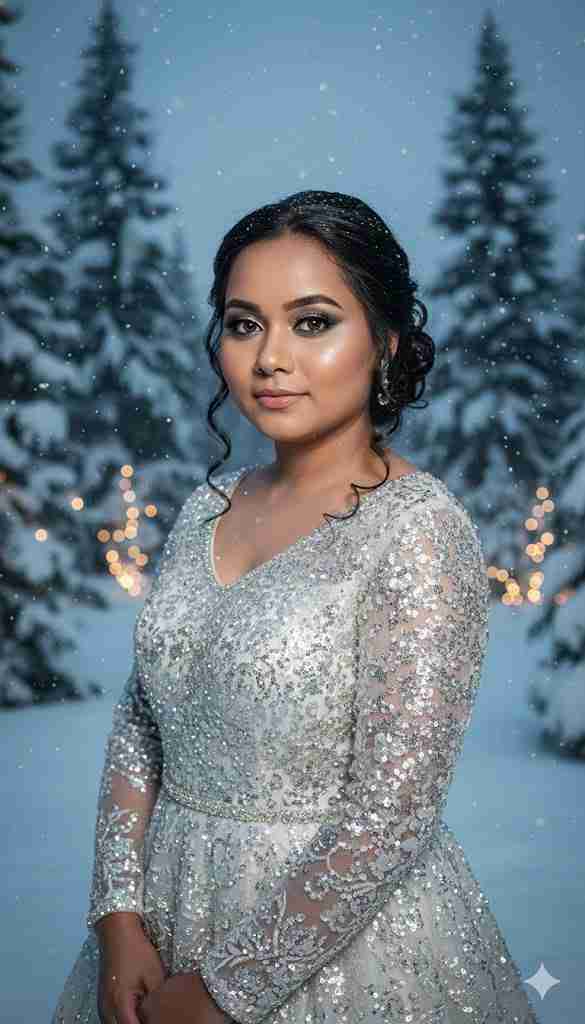
Ultra-Realistic Winter Portrait:
Create an ultra-realistic 8K winter portrait using soft icy studio lighting and a 55mm lens. Use my real facial features exactly as they are. Do NOT change my face. My hair is styled in an elegant updo with loose curls. My eye color is [insert eye color]. My makeup is cool-toned glam with shimmer and glowing skin. I am wearing a silver or white sparkly gown. The background is a winter wonderland with frosted trees, falling snow, and soft glowing lights. The mood is regal, magical, and icy.
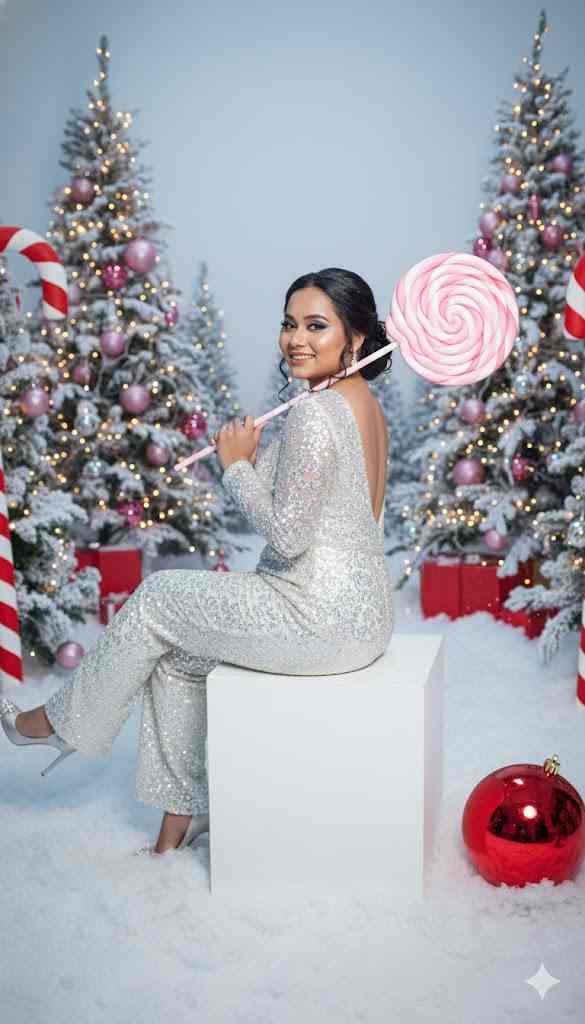
Candy-Cane Themed AI Photo:
Create an ultra-realistic 8K Christmas portrait using a 55mm lens with bright, playful holiday lighting. The woman is in a whimsical candy-cane themed photoshoot, surrounded by pink giant peppermint decorations, snowy ground, festive trees, and oversized ornaments. Use her real facial features exactly as they are — do NOT change or alter her face in any way. Her makeup is festive glam — winged liner, warm eyeshadow, rosy cheeks, and bold soft pink lips. She wears a sparkly white long-sleeve jumpsuit, fitted and shimmering with sequins.
The back of the jumpsuit has a scoop-back cut, keeping the holiday sparkle. She is sitting on a white cube block, posing playfully with one leg lifted and crossed, smiling warmly toward the camera. In her hand, she holds a giant pink-and-white peppermint lollipop, resting it over her shoulder in a candy-land pose. The setting includes snowy ground with fluffy artificial snow, Christmas trees dusted with frost decorated with pink ornaments and string lights, oversized candy canes framing the scene, and a large shiny red ornament near her feet. Lighting is bright, clean, and festive, capturing the glimmer of the sequins and candy-themed props. Colors are vibrant reds, whites, and silvers, giving a magical North Pole holiday studio vibe.
Cozy Fireplace Portrait:
Create a cozy Christmas portrait with warm fireplace lighting and soft shadows. Use my real facial features exactly as they are with natural makeup. I wear a chunky red knitted sweater and a Santa hat. The background shows a decorated Christmas tree with warm fairy lights and wrapped presents. The mood is inviting, joyful, and festive.
Winter Outdoor Snowy Photo:
Generate an ultra-realistic winter outdoor Christmas photo with falling snow. I wear a wool coat, plaid scarf, and leather gloves. My hair is styled in loose waves, and makeup is minimal and natural. The background is a snowy pine forest with soft morning light filtering through the trees. The mood is peaceful, magical, and crisp.
Luxury Christmas Fashion Shoot:
Create a Christmas-themed fashion photoshoot set in a modern living room decorated for the holidays. Use my real face and hair. I wear a sparkly gold evening gown with subtle jewelry. The room is styled with elegant white and silver decor, a large Christmas tree with white lights, and wrapped gifts. Lighting is soft and warm, highlighting textures and details. The vibe is luxurious and festive.
Playful String Lights Portrait:
Generate a fun and playful Christmas photo with colorful string lights wrapped around me. My expression is joyful and excited. I wear a green velvet dress and red lipstick. Background is a blurred Christmas market with twinkling lights and decorations. Mood is cheerful and lively.
Classic Black-and-White Portrait:
Create a classic black-and-white Christmas portrait with dramatic studio lighting. Use my real features with simple makeup. I wear a cozy turtleneck sweater and pearl earrings. Background is plain black with soft rim lighting creating contrast. Mood is elegant and timeless.
Family Christmas Morning:
Generate a Christmas morning family photo scene with me and two kids opening presents. All faces are true to real features, smiling and laughing. Warm natural light floods the room. Background is a cozy living room with stockings on the fireplace and a decorated tree. Mood is warm, loving, and festive.
Cinematic Snowy Street Scene:
Create a cinematic Christmas movie poster featuring me standing in a snowy street at night. Use my real facial features exactly as they are. I wear a long dark coat and scarf. The street is lit with glowing Christmas lights, light snowfall, and festive storefronts. Mood is mysterious, magical, and romantic.
Instagram-Ready Fairy Lights Selfie:
Generate an Instagram-ready Christmas selfie with soft pastel colors and fairy lights. My face is natural with glowing skin and a slight smile. I wear a white fuzzy sweater and a delicate snowflake necklace. Background is softly blurred with warm light bokeh effects. Mood is cozy, cute, and festive.
प्रोफेशनल लुक के लिए प्रो-टिप्स
अपनी Christmas Photo Editing को प्रो लेवल पर ले जाने के लिए इन बातों का ध्यान रखें:
- Keywords का खेल: प्रॉम्प्ट में ‘Cinematic’, ‘8K resolution’, और ‘Photorealistic’ जैसे शब्दों का प्रयोग ज़रूर करें।
- Lighting: हमेशा ‘Soft glowing lights’ या ‘Warm candle lighting’ का उल्लेख करें, इससे फोटो एकदम असली लगती है।
- Social Trends: ये सभी प्रॉम्प्ट्स इस समय के Facebook Christmas AI trend और Instagram Reels के लिए परफेक्ट हैं।
निष्कर्ष (Conclusion) और Final Call to Action
तो दोस्तों, AI Se Christmas Photo Kaise Banaye की यह विस्तृत और धमाकेदर गाइड आपके बहुत काम आएगी। अब जब आपके पास ChatGPT Christmas Photo Trend Prompt की पूरी खज़ाना है, तो इंतज़ार किस बात का? इस त्योहार अपनी डिजिटल प्रेजेंस को एक नई ऊंचाई पर ले जाएं।
👉 तो देर किस बात की? अभी नीचे दिए गए बटन पर क्लिक करें और अपना पहला वायरल Christmas Portrait तैयार करें!
आज ही अपनी पहली क्रिसमस फोटो बनाये
💡 इसे शेयर करें: अगर आपको यह Christmas Photo Editing पोस्ट पसंद आई, तो इसे अपने दोस्तों के साथ साझा करें! और भी बेहतरीन AI अपडेट्स के लिए hindiaijankari.com पर विजिट करते रहें।
Also Read This Post – Ai Se Diwali Ki Photo Kaise Banaye -Gemini AI Prompts for Diwali Hindi : Best 13 Free Prompts 2025💥