नमस्ते दोस्तों! अगर आप AI की दुनिया में हैं, तो आपने Google के सबसे नए और सबसे एडवांस इमेज मॉडल Nano Banana के बारे में ज़रूर सुना होगा। यह अब सिर्फ एक मज़ाकिया नाम नहीं है, बल्कि Google Gemini का वो जादुई टूल है जो आपकी कल्पना को Pro-Grade Visuals में बदल देता है।
Nano Banana Se Photo Kaise Banaye? यह सवाल अब सिर्फ इमेज जनरेट करने तक सीमित नहीं है। Nano Banana (और इसका एडवांस्ड वर्जन Nano Banana Pro) की मदद से आप:
- Text-to-Image Generation: शब्दों से नई तस्वीरें बना सकते हैं।
- Conversational Editing: अपनी पुरानी तस्वीरों को टेक्स्ट कमांड देकर एडिट कर सकते हैं (जैसे: “इस फोटो में बैकग्राउंड से आदमी को हटा दो”)।
- Visual Context: 14 रेफरेंस इमेजेस तक अपलोड करके अपनी ब्रांडिंग को मेंटेन कर सकते हैं।
यह महागाइड आपको एकदम सरल भाषा में सिखाएगी कि Gemini App के अंदर उपलब्ध इस शक्तिशाली टूल को कैसे उपयोग करें, ताकि आप भी DSLR क्वालिटी की तस्वीरें आसानी से बना सकें।
Nano Banana Models: Fast vs. Pro (कौन सा बेहतर है?)
Nano Banana Google के Gemini Image Model के दो मुख्य रूपों में उपलब्ध है। सही फोटो बनाने के लिए दोनों के बीच का अंतर समझना ज़रूरी है:
| Feature | Nano Banana (Fast) | Nano Banana Pro (Thinking) |
| आधार मॉडल | Gemini 2.5 Flash Image | Gemini 3 Pro Image (Advanced) |
| स्पीड | बहुत तेज़ (Quick and Casual edits) | थोड़ा धीमा (Detailed, Professional work) |
| रिज़ॉल्यूशन | स्टैंडर्ड (1K-2K) | Ultra HD (4K तक) |
| टेक्स्ट रेंडरिंग | सामान्य (अक्सर गड़बड़) | उत्कृष्ट (Perfect for posters, logos) |
| कंट्रोल | सीमित (General edits) | स्टूडियो-ग्रेड (Lighting, Focus, Camera Angles) |
| एक्सेस | Gemini App में “Fast” मॉडल, मुफ्त उपयोगकर्ताओं के लिए ज़्यादा उपलब्ध। | Gemini App में “Thinking” मॉडल, सब्सक्राइबर/सीमित मुफ्त उपयोग। |
हमारा सुझाव: अगर आपको जल्दी में रफ़ आइडिया चाहिए, तो Nano Banana (Fast) यूज़ करें। अगर आपको प्रोफेशनल क्वालिटी, सटीक एडिटिंग या 4K आउटपुट चाहिए, तो Nano Banana Pro (Thinking) यूज़ करें।
Nano Banana Se Photo Kaise Banaye: Step-by-Step Guide
Nano Banana Se Photo Kaise Banaye इसकी प्रक्रिया बहुत सीधी और आपके फ़ोन या कंप्यूटर पर उपलब्ध है:
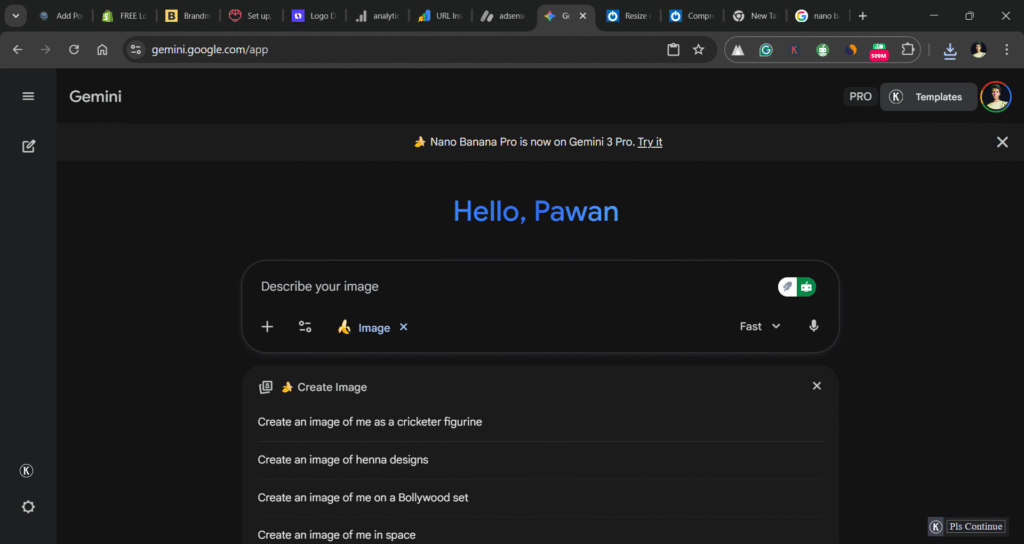
Step 1: Gemini AI App खोलें और Image Tool चुनें
- Gemini App खोलें: Google पर gemini.google.com सर्च करें या अपने फ़ोन में Gemini App खोलें।
- टूल सिलेक्ट करें: Chat Interface में, “🍌 Create Images” या “Image Generation” विकल्प को चुनें।
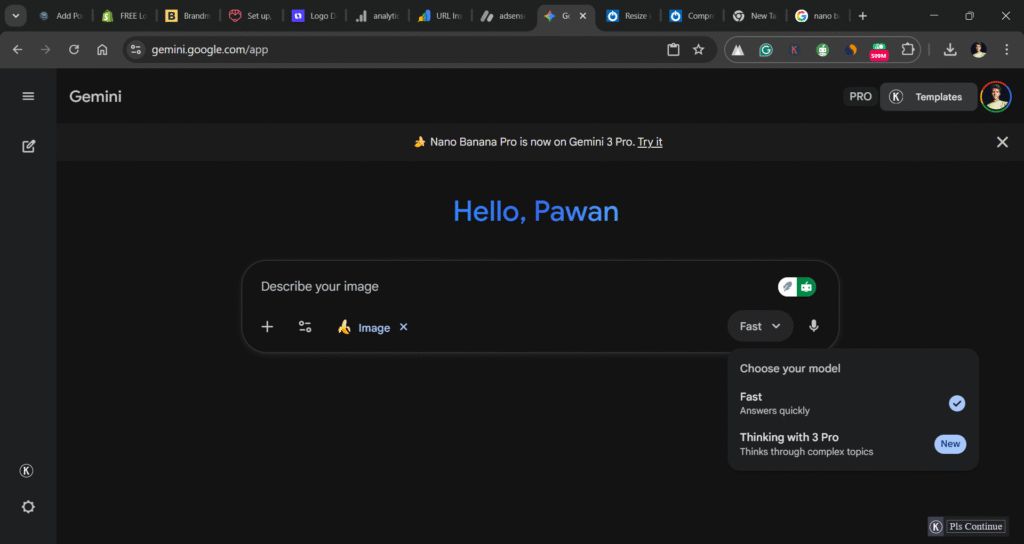
Step 2: मॉडल (Fast या Thinking) चुनें
आपके पास दो विकल्प होंगे:
- “Fast” (Nano Banana) – तेज़ और जनरल इमेज क्रिएशन के लिए।
- “Thinking” (Nano Banana Pro) – 4K, एडवांस्ड एडिटिंग और डिटेलिंग के लिए।
अपनी ज़रूरत के हिसाब से मॉडल चुनें।
Step 3: Prompt या Image Upload करें
- नई फोटो बनाने के लिए: टेक्स्ट प्रॉम्प्ट (निर्देश) लिखें। जैसे: “Generate a photorealistic image of a futuristic cityscape at sunset.”
- पुरानी फोटो एडिट करने के लिए: अपनी गैलरी से एक फोटो अपलोड करें और फिर टेक्स्ट कमांड दें। जैसे: “Upload this image and change the background to a snowy mountain.”
Step 4: Refinement और Download
- AI द्वारा बनाई गई 4 अलग-अलग Variations देखें।
- अगर बदलाव चाहिए तो, फॉलो-अप प्रॉम्प्ट दें (जैसे: “Make the lighting golden hour” या “Remove the bird from the corner.”)।
- जब फाइनल फोटो बन जाए, तो उसे Download करें।
Also Read This Post – Gemini Se Maternity Shoot Kaise Karein : 10 मिनट में Perfect Maternity Shoot! टॉप 7 पोज़ और थीम्स से बेस्ट मोमेंट्स कैप्चर करें।
टॉप 10 Nano Banana Prompts (Advanced Features और English Prompts)
Nano Banana Pro की शक्तियों का पूरा इस्तेमाल करने के लिए, आपको एडवांस्ड कमांड्स का उपयोग करना होगा। ये Prompts आपके Image Creation और Editing को अगले स्तर पर ले जाएंगे:
Advanced Generation and Styling (नई फोटो बनाना)
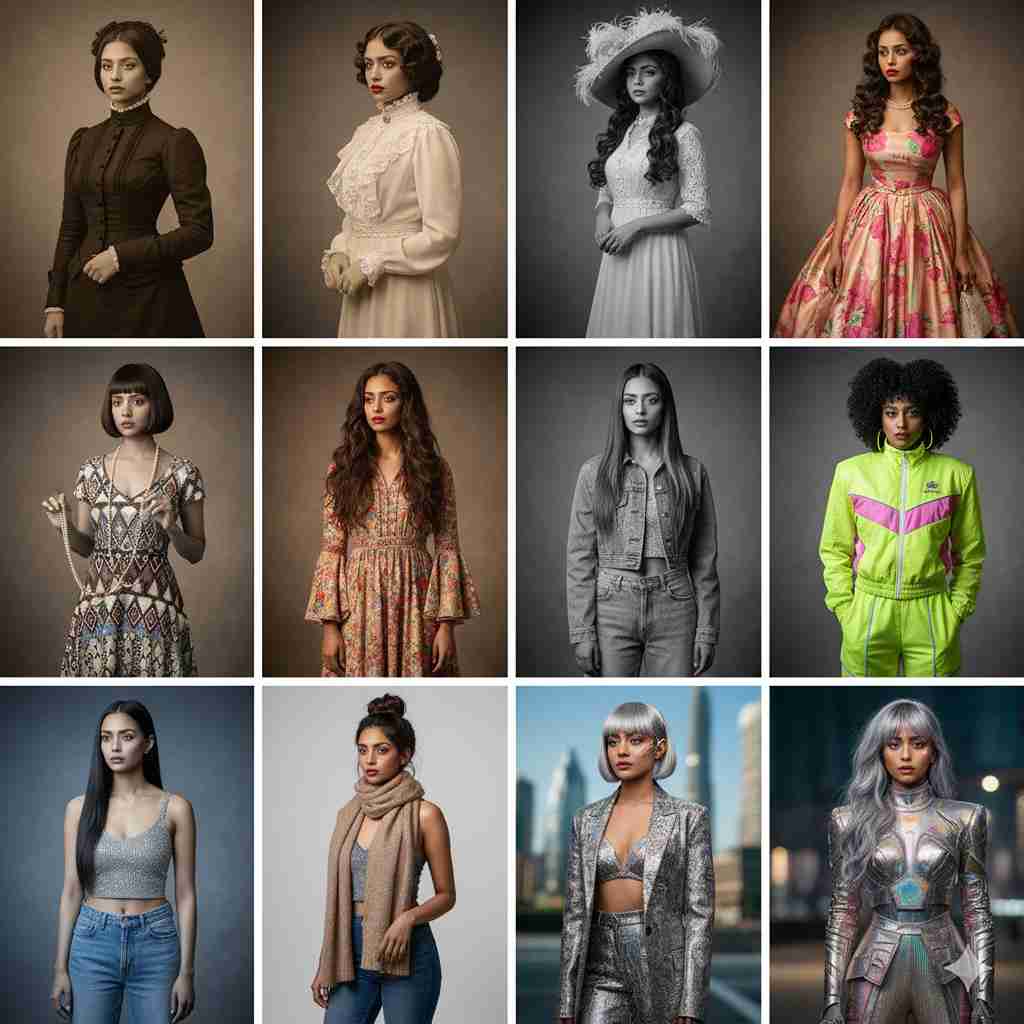
Decade Grid Transformation (दशक परिवर्तन):
This prompt leverages Nano Banana Pro’s understanding of historical context and fashion. The request should be to
“Make a 4×4 grid portrait. In each section, the subject should appear styled according to that decade, starting from the 1880s to 2020s, including era-specific clothing, hairstyles, and accessories. Use accurate historical photographic styles for each panel.” This is perfect for the viral social media trend.
Product Mockup with Text (उत्पाद प्रदर्शन):
This prompt utilizes the Pro model’s strong text rendering and context awareness. Ask to
“Generate a photorealistic product shot of a sleek, matte black coffee mug with a custom logo that clearly reads ‘MORNING BREW’ in a bold white sans-serif font. The mug should be placed on a rustic wooden desk with soft, cinematic lighting.”

Character Consistency (पात्रों में स्थिरता):
This is a multi-turn technique. First, generate a base character:
“Generate a consistent character: a stoic robot barista with glowing blue optics, wearing a leather apron.”
Then, in the next turn, follow up with an editing prompt while referencing the character:
“Place the same robot barista in a futuristic café interior, pouring steamed milk into a cup. Medium shot, low angle, cinematic teal color grading.”
Infographic Creation (तथ्यात्मक जानकारी):
Leveraging the Gemini integration with Google Search for factual context. Prompt the AI:
“Generate a clear, educational infographic about the process of photosynthesis, featuring a detailed diagram and legible, step-by-step text in Hindi.”
Conversational Editing and Refinement (फोटो एडिटिंग)
Seamless Background Swap (बैकग्राउंड बदलना):
This is for editing an uploaded photo. Upload a photo and then prompt:
“Replace the entire background of this image with a photorealistic, dreamy landscape of the Northern Lights (Aurora Borealis). Ensure the original subject’s lighting matches the cool blue environment.”
Lighting and Angle Control (रोशनी और कोण):
To turn a day photo into night, use this editing prompt:
“Adjust the lighting of the uploaded image to resemble a moody, dramatic nighttime scene with streetlights casting long shadows. Apply a cinematic teal and orange color grade.”
For camera angles, you can add:
“Shift the camera angle to a low angle, making the subject appear more dominant.”
Object Removal and Replacement (वस्तु हटाना और बदलना):
This is a simple but powerful edit. Upload an image and simply ask:
“Remove the car parked in the background and replace it with a blooming flower garden. Make the change seamless and highly detailed.”
Vintage Photo Restoration (पुरानी फोटो की मरम्मत):
Nano Banana Pro excels here. Upload an old, faded photo and prompt:
“Complete restoration of this damaged old photo. Remove all scratches, dust, and deep fold lines. Correct color fading, eliminate artifacts, and sharpen facial details realistically without over-smoothing the skin. Pristine, sharp, 4K quality.”
Multi-Image Blending (कई तस्वीरों को मिलाना):
If you upload 3 images (A, B, C), you can ask:
“Combine the character from Image A, the art style of Image B, and the background setting of Image C into a single, cohesive photorealistic visual.”
Focus and Depth Control (फोकस और गहराई):
Use this to give your edited photo a professional look. Upload a photo and command:
“Apply a shallow depth of field (f/1.8). Focus sharply on the subject’s face while blurring the immediate foreground and background to enhance the cinematic portrait effect.”
प्रो-टिप्स: Nano Banana Pro को Expert की तरह कैसे चलाएँ?
Nano Banana Pro एक प्रो टूल है, इसलिए इसे Expert की तरह यूज़ करने के लिए इन बातों का ध्यान रखें:
- Iteration है कुंजी: एक परफेक्ट फोटो कभी एक प्रॉम्प्ट में नहीं बनती। पहले जनरल प्रॉम्प्ट दें, फिर Conversationally refine करें (जैसे: “अब इसका रंग लाल कर दो” या “इसमें और डिटेल जोड़ो”)।
- कैमरा शब्दावली: अपने प्रॉम्प्ट में कैमरा लेंस, एपर्चर, और लाइटिंग के शब्द इस्तेमाल करें (जैसे: “shot on a 85mm lens,” “golden hour backlighting,” या “f/1.4 depth of field”)।
- Negative Prompting: AI को बताएं कि आपको क्या नहीं चाहिए (जैसे: “avoid blurry edges,” “no cartoon style,” या “remove visible watermarks”)।
- 4K का उपयोग: हाई-रिज़ॉल्यूशन आउटपुट पाने के लिए प्रॉम्प्ट में “4K resolution,” “Ultra HD,” या “Professional print quality” जैसे शब्द जोड़ें।
- टेक्स्ट को चेक करें: Nano Banana Pro टेक्स्ट बहुत अच्छा बनाता है, लेकिन फिर भी नाम, लोगो, और टैगलाइन को एक बार Proofread ज़रूर करें।
Nano Banana के Practical Use Cases (Professional & Creative)
Nano Banana सिर्फ़ मज़ाक के लिए नहीं है, यह प्रोफेशनल काम के लिए भी एक गेम चेंजर है:
- मार्केटिंग और सोशल मीडिया: आप मिनटों में Product Mockups बना सकते हैं, जहाँ आपका प्रोडक्ट किसी भी सीन में रखा हो। यह सोशल मीडिया कैंपेन के लिए बेहतरीन है।
- ब्रांड कंसिस्टेंसी: 14 रेफरेंस इमेज अपलोड करके आप सुनिश्चित कर सकते हैं कि आपका लोगो, रंग या चरित्र हर फोटो में एक जैसा दिखे।
- शैक्षिक सामग्री (Educational Content): Nano Banana सटीक डायग्राम और Infographics बना सकता है, जिससे आपकी ट्रेनिंग मैनुअल या प्रेजेंटेशन ज़्यादा प्रभावी हो जाती है।
- फैशन और डिजाइन: आप कपड़ों के डिज़ाइन को अलग-अलग मॉडल्स पर तुरंत टेस्ट कर सकते हैं, या इंटीरियर डिज़ाइन के लिए अलग-अलग रंगों को दीवारों पर लगाकर देख सकते हैं।
FAQ: Nano Banana से जुड़े आपके ज़रूरी सवाल
Q1: Nano Banana और Nano Banana Pro में क्या अंतर है?
Ans: Nano Banana (Fast) सामान्य और तेज़ जनरेशन के लिए है, जबकि Nano Banana Pro (Thinking) 4K क्वालिटी, सटीक एडिटिंग, और टेक्स्ट रेंडरिंग जैसी एडवांस्ड सुविधाओं के लिए है।
Q2: क्या Nano Banana का उपयोग पूरी तरह से फ्री है?
Ans: Nano Banana (Fast) मुफ्त यूज़र्स के लिए ज़्यादा उपलब्ध है। Nano Banana Pro (Thinking) के लिए सीमित मुफ्त जनरेशन मिलती है, लेकिन ज़्यादा उपयोग के लिए Google AI Plus या Ultra जैसे सब्सक्रिप्शन लेने पड़ सकते हैं।
Q3: क्या Nano Banana द्वारा बनाई गई Images पर Watermark आता है?
Ans: हाँ, मुफ्त Nano Banana अकाउंट से बनाई गई सभी AI-जनरेटेड इमेज पर SynthID Digital Watermark आता है, जो बताता है कि यह AI द्वारा बनी है।
Q4: Nano Banana से फोटो एडिट कैसे करते हैं?
Ans: आप Gemini App में फोटो अपलोड करते हैं और फिर टेक्स्ट प्रॉम्प्ट देते हैं (जैसे: “Remove the sunglasses” या “Make the subject’s shirt green”)।
निष्कर्ष (Conclusion) और Final Call to Action
Nano Banana Se Photo Kaise Banaye – अब यह सिर्फ एक सवाल नहीं, बल्कि एक Creative Opportunity है! आपने देखा कि Google का यह AI टूल (Nano Banana) कितना शक्तिशाली है, जो आपको बिना किसी जटिल सॉफ्टवेयर के, प्रोफेशनल-ग्रेड इमेज बनाने और एडिट करने की सुविधा देता है।
चाहे आप एक Content Creator हों, डिजाइनर हों, या बस अपनी पुरानी फैमिली फोटो को ठीक करना चाहते हों, Nano Banana Pro आपकी कल्पना को हकीकत में बदलने का सबसे आसान रास्ता है।
👉 तो देर किस बात की? अभी Gemini App खोलें, ‘Thinking’ मॉडल (Nano Banana Pro) चुनें, और अपनी पहली 4K, Pro-Grade Photo बनाकर इस AI क्रांति का हिस्सा बनें!
💡 इस गाइड को शेयर करें: ऐसी ही एडवांस्ड AI और Guides के लिए हमारी वेबसाइट hindiaijankari.com पर बने रहें!
1 thought on “Nano Banana Se Photo Kaise Banaye | सिर्फ़ 2 मिनट में 5 Amazing प्रो फोटो बनाएँ! यह Trick आपका टाइम बचाएगी।”